
Hublead can only log LinkedIn invitations for people who already exist as contacts in HubSpot. A short delay between the action on LinkedIn and the update in HubSpot is normal.
If the contact exists in HubSpot and you still do not see the properties “Last LinkedIn invitation sent date” or “Last LinkedIn invitation accepted date”, follow the steps below. If the issue persists after these checks, we may need to investigate that specific record.
Troubleshooting missing LinkedIn invitation data in HubSpot
1. Make sure your LinkedIn contacts exist in HubSpot
Hublead only syncs LinkedIn activity for existing HubSpot contacts.
Please check:
- Have you imported all relevant contacts into HubSpot?
- For each person you sent a LinkedIn invitation to, can you find a matching contact in HubSpot?
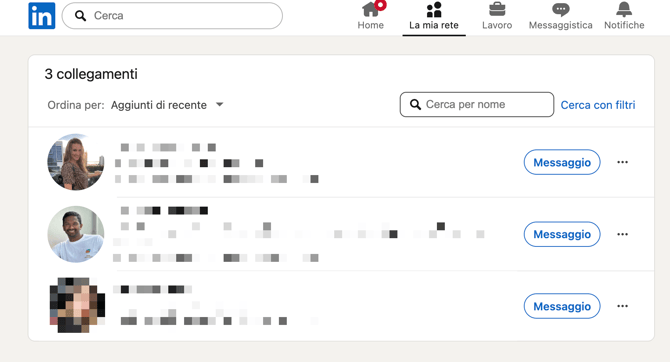
- Is there anyone you invited on LinkedIn who exists only on LinkedIn and not yet as a HubSpot contact?
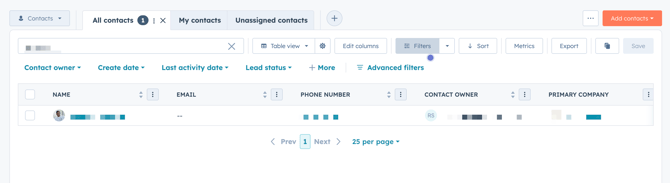
If someone is not yet a HubSpot contact, Hublead cannot log the LinkedIn invitation sent or accepted information for that person.
2. Allow for a short delay
A small delay between sending the LinkedIn invitation and seeing it in HubSpot is expected.
- If you sent the invitation today, wait a bit before checking in HubSpot.
- Check again later to see if:
- a Hublead “LinkedIn invitation sent” event is visible on the contact’s timeline, or
- the properties “Last LinkedIn invitation sent date” and/or “Last LinkedIn invitation accepted date” have been updated.
If the invitation is very recent, the sync may simply not have completed yet
3. Validate on one specific contact
To diagnose the issue, pick one example contact and verify the following:
- The person exists as a contact in HubSpot.
- You have sent them a LinkedIn connection invitation.
- In HubSpot, open that contact and check:
- The timeline for Hublead / LinkedIn invitation events.
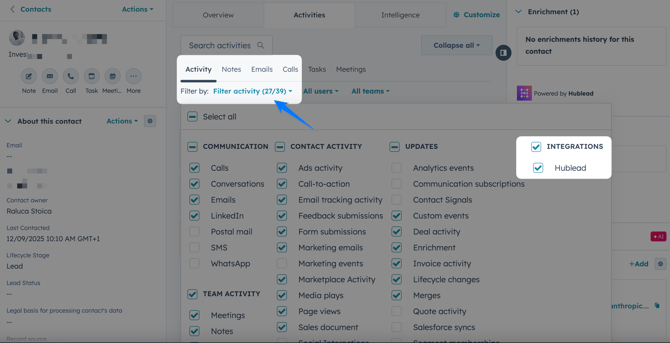
- The Hublead properties, especially:
.png?width=670&height=339&name=CleanShot%202025-12-09%20at%2012.58.27@2x%20(1).png)
-
"Last LinkedIn invitation sent date"
- "Last LinkedIn invitation accepted date"
If:
- the HubSpot contact exists,
- some time has passed since you sent the invitation, and
- you still do not see:
- any Hublead “LinkedIn invitation sent” event, and/or
- any data in the related Hublead properties,
then proceed to the next step.
- The timeline for Hublead / LinkedIn invitation events.
4. Still not working? Share an example with our team
If you identify a contact that should have “LinkedIn invitation sent” data but does not, please send us one concrete example so we can investigate.
Provide:
- The URL of the HubSpot contact record, and
- A screenshot showing:
- The HubSpot contact view where the Hublead invitation data is missing (timeline and properties), and
- Optionally, the LinkedIn profile / invitation sent for that person.
Send this information via your usual support channel